
Minimal APIs
https://github.com/jmarkman/PluralsightMinimalApi
I accidentally uploaded the SQLite database to the repository. It's a private repo and the database is regenerated with every migration on certain commits, so it's not a huge deal.
Module 2
Module 2 is about the extreme basics of minimal API and setting up the demo project
- Minimal API is a stripped down version of ASP.NET; it sacrifices some built-ins like model validation and the MVC pattern itself to enable smaller API codebases with faster development and deployment times
- All the usual stuff like DI and configuration is still there as we know it
- Kevin likes to have an app like Postman or HTTPie to ping the local development API, I did this on another project for work and can confirm this is a nicer workflow (conditions apply, like you'll still need a full launch if you're working on frontend+backend and checking visuals)
- Entity Framework Core + SQLite is OP; install the Sqlite provider and the Tools library and EF will spit out a .db file in the root of your project when you perform a migration
Module 3
- Once you get the WebApplication object back from WebApplication.CreateBuilder(args), you can easily create retrieval endpoints by calling the MapGet method on the WebApplication instance
- MapGet is smart enough to inference the return type via reflection and will still spit out JSON in your API testing client as expected
- MapGet and all of the Map[HttpRequest] methods handle creating the routing for your endpoints; it matches a HTTP method and URI to a specific route handler
-
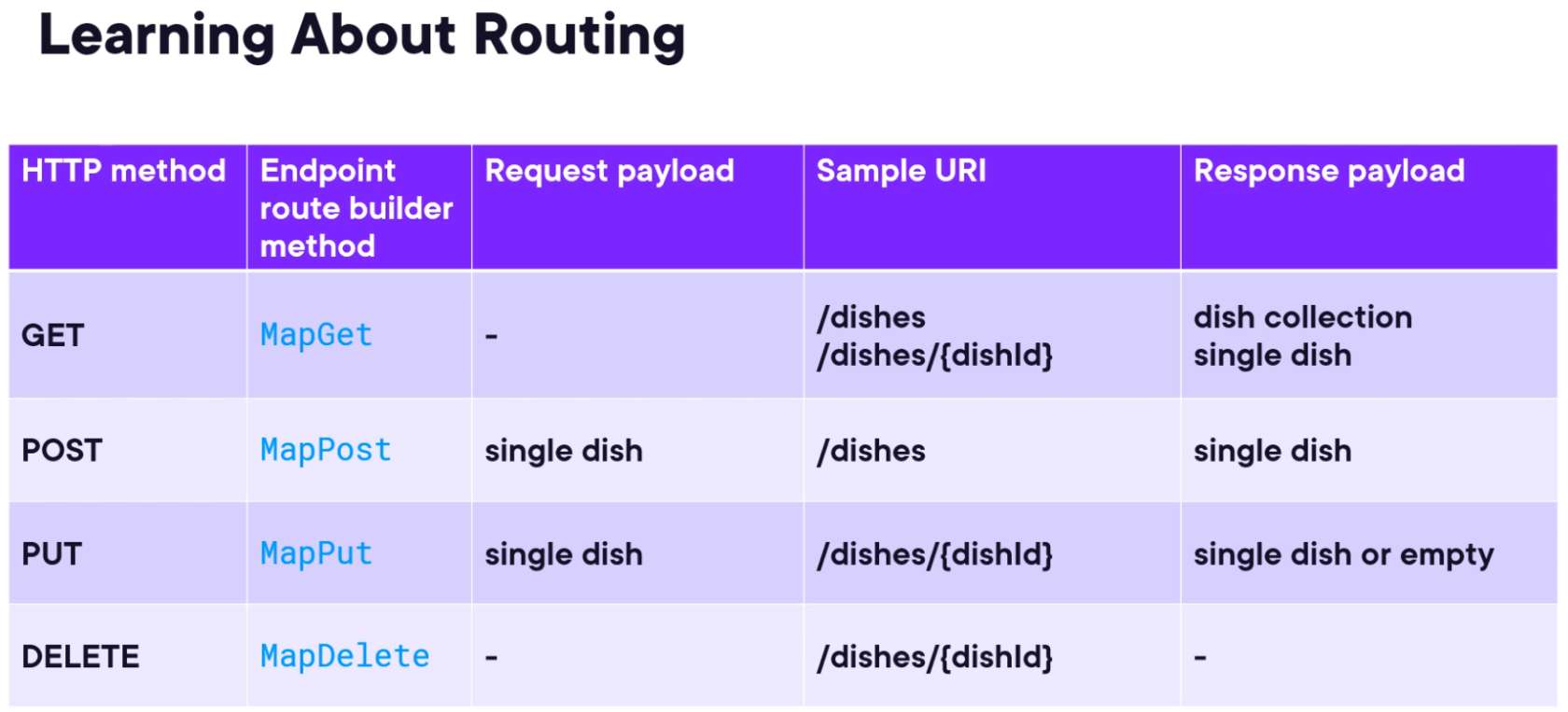
- Implementing MapGet and MapGet with parameters is pretty straightforward, if you've done parameterized endpoints before you can do it for Minimal APIs, except there's less cruft and boilerplate without the MVC pattern on top of it
- Kevin purposefully writes a MapGet endpoint, dishes/{dishId}/ingredients, that results in a circular reference; he's setting the stage for later in the module where he introduces AutoMapper and DTOs
- When making multiple parameterized routes that share a similar route, i.e., dishes/{dishId} and dishes/{dishName}, we can remove the ambiguity by typing the paramter: dishes/{dishId:guid}. This is known as "route constraints" in Minimal API. Microsoft included several common types with Minimal API, such as guid, int, bool, and datetime.
- Vocab: Entity Models are means to represent database rows as objects graphs
- Warning! This isn't Kevin's fault, but his demo for AutoMapper requires some changes because AutoMapper went commercial. As of 2025 it's not sufficient to just pass your assemblies, you need to get an API key from AutoMapper in addition to specifying your assemblies.
- Parameter binding allows us to specify where certain inputs for the Map method are coming from: [FromServices] for services like EF, AutoMapper, [FromRoute] is obvious, etc. I didn't immediately implement the example Kevin showed off since it was so brief.
- Returning status codes is the same in Minimal API as it is in MVC: you return a string, a type, or an IResult, and the IResult lets you return status codes
Module 4
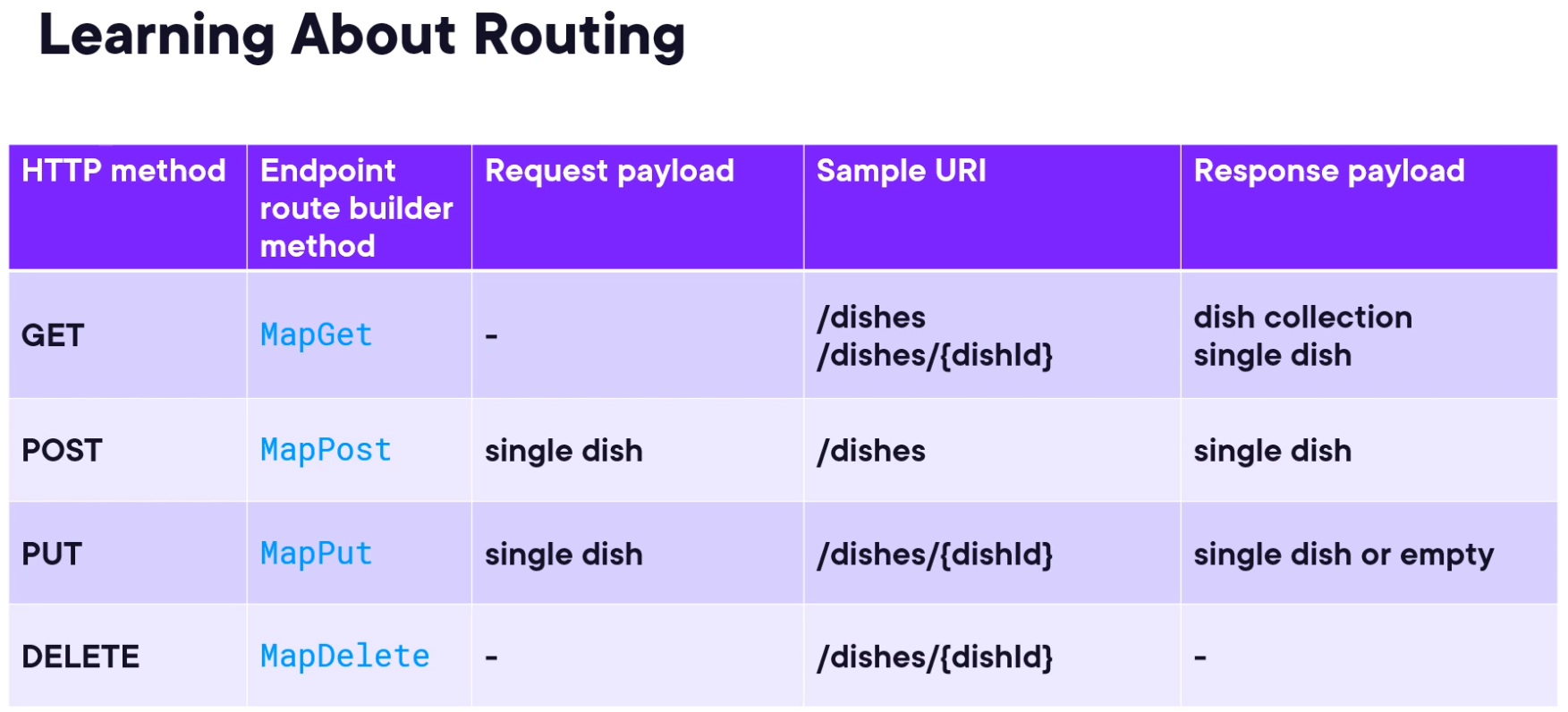
This module is about doing CRUD operations with Minimal API. The code I followed along with will reveal more about CRUD operations with Minimal API, but the following are notes I took that seemed important:
- The Map methods support fluent interfaces. When you're building out an add endpoint using MapPost, you can attach a WithName method to a relevant MapGet method and name it so you can reliably generate an "end result" URL. For example, when we're adding a new dish via MapPost, we should redirect the user to the newly created dish (resource). We can do that by attaching WithName("GetDish") to the MapGet method for getting a specific dish. Back in the MapPost for making a new dish, we can then call TypedResults.CreatedAtRoute() and pass in the dish that was created, the name created with WithName(), and an anonymous object that contains the identifier we'd pass to the MapGet() method.
- Fundies review:
- If we get to the point where we're adding child items to an entity, like adding ingredients to a dish, we're hitting that parent-child relationship and need to validate that the dish we're adding one or more ingredients to exists. Be aware of hierarchies of existence.
- If you want to create multiple entities, create an endpoint that handles multiples. Don't re-use an endpoint for both singular and multiple additions to the database, i.e., dish and dishcollection
- Be careful when making PUTs on entities with collections on them or collections of resources, because PUTs can be destructive (i.e., overriding the entire collection). PUT requests are intended for full updates, PATCH requests are intended for isolated updates, and in ASP.NET Core as a whole, you need to add the official libraries for JsonPatch (Microsoft.AspNetCore.JsonPatch) and JsonPatch.SystemTextJson (Microsoft.AspNetCore.JsonPatch.SystemTextJson) to use JsonPatchDocuments.
- We can actually group all of these Map[HttpRequest] methods together with the MapGroup method. It abstracts the URL slug that represents an endpoint that can accept multiple types of HTTP requests like Get, Post, and Delete.
- Additionally, content negotiation (i.e., the format we return data based on what the client/user provides via the request header) is not supported out of the box for Minimal APIs. Microsoft doesn't intend to add support for content negotiation out of the box since it's supposed to be minimal; if you have a Minimal API, chances are you have a minimal amount of client types that care about how you send data to them. If you desperately need content negotiation, there's a library called Carter that's supposed to have content negotiation as an extension method for ASP.NET Core Minimal API, but you're likely going to want full MVC vs Minimal API at that point.
- Input validation also has no support in Minimal API. You either need to roll your own or leverage a library like MiniValidation, o9d-aspnet or FluentValidation, and you'll have to consult the docs for each library for implementing it.
Module 5
Kevin uses this module to offer optional guidance on dividing your code into modules instead of having all your endpoints stuck in Program.cs
- First option is pretty basic, just extract the inline lambda into its own method and call the method (delegates ftw).
- Kevin suggests stuffing these methods in a static class that represents a specific endpoint or functionality, which works I guess
- Kevin ultimately settles on extending the IEndpointRouteBuilder interface, where we register methods onto the WebApplication instance we get back from WebApplication.CreateBuilder().Build().
- The library Carter, mentioned earlier, has functionality that mimics this last approach as well
Module 6
Thankfully, the usual bits for logging and exception handling are still there in Minimal API. We still get the middleware dev page (default) and we have access to exception handling middleware via app.UseExceptionHandler() (not default, have to call this in your app setup pipeline).
Logging is the same as it ever was. Basically zero change from how you'd add it to a MVC-based ASP.NET API.
Module 7
MVC has a robust filter pipeline that allows us to run code before or after specific stages in the request pipeline.
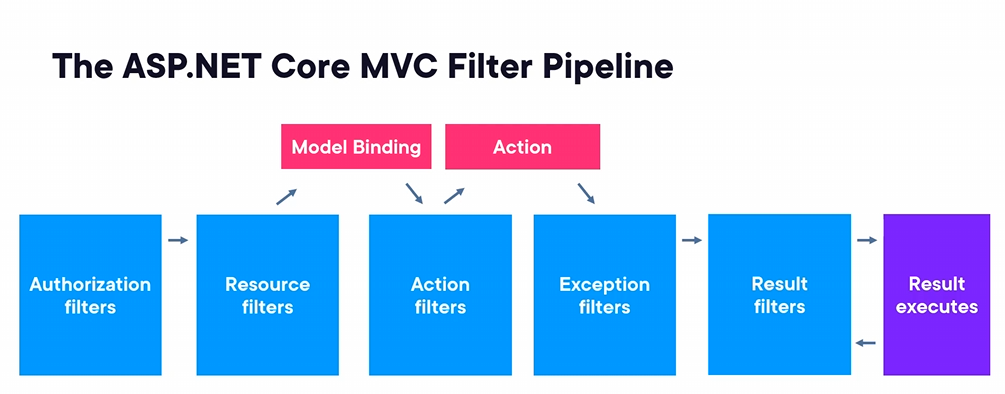
... We lose this when we leverage Minimal API. Damn. But in its place, we get a lighter version called "endpoint filters". They're not as robust in terms of number of filters on stages of the request lifecycle, but they get roughly the same job done. Remember, we're supposed to be trading off a lot of MVC boilerplate and other tools that we don't need for small APIs and microservices.
Endpoint filters:
- enable running code before and after the endpoint handler
- inspecting and modifying parameters (input) provided during endpoint handler invocation
- inspecting the response behavior of an endpoint handler
The order in which endpoint filters are added matters; a request travels down the list of endpoint filters and the response goes up the list (reverse!). Filters can also short-circuit the pipeline, skipping other filters based on certain dev-specified conditions.
We can tack on AddEndpointFilter() to the end of any Map[HttpMethod], implement a lambda with our filter code, and we're done. Adding reusable filters is also easy enough: create a class that implements IEndpointFilter, add the code, and add the class as a type to AddEndpointFilter like AddEndpointFilter<CustomFilter>
We can also go sicko mode by putting a custom filter on a MapGroup, then just assign our Map[HttpMethod] methods to the object returned from MapGroup.
I skipped implementing the response filter because it's also using IEndpointFilter, but we have to cache the result of next(context), then make decisions based on the status code of processing the incoming request. This is useful for post-request modifications or logging various failure states.
I also skipped the validation of input because it leverages MiniValidation (the library mentioned in Module 4) and that's something that can be tackled at the time of API creation.
Module 8
This module is a bit more interesting because it deals with elementary API security.
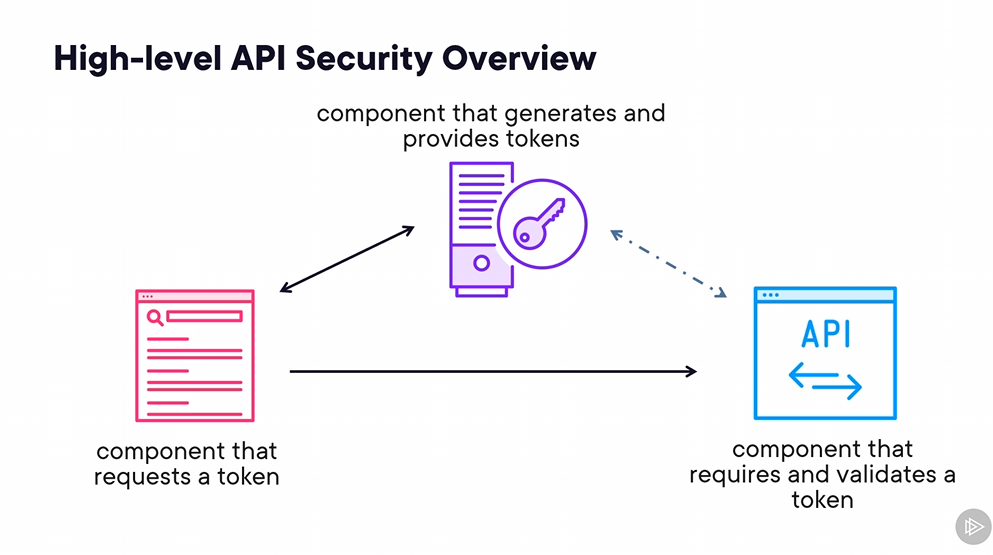
There's no "one size fits all" approach to securing clients and APIs. Today's (2020s) most common approach is still token-based security aka API keys; anything that wants access must present a token that says "this entity has permission to access these API features".
JWT = JSON Web Token
Token-based security doesn't have to use JWTs but they often do.
A JWT has several parts that make it work
{
  // User's unique identifier
  "sub": "unique_identifier",
  // User's name
  "given_name": "foobar",
  // User's role
  "role": "admin",
  // JWT ID
  "jti:": "7a600c58",
  // Audience - used by the API to verify that the JWT is actually for the API
  "aud": "menu-api",
  "nbf": "1678107105",
  // Expiration time of token in Unix Epoch time
  "exp": "1686055905",
  "iat": "1678107106",
  "iss": "dotnet-user-jwts"
}
In the context of this course, it's the responsibility of the API to validate the authenticity and validity of an incoming JWT. The API is not responsible for generating JWTs or other tokens, nor is it responsible for providing JWTs or other tokens.
Common practice has clients provide a JWT as part of the authentication header on each request to the API.
Authentication: The process of determining whether someone or something is who or what it says it is
There are basic ways of generating tokens within the API, but as stated earlier, this isn't and shouldn't be the API's responsibility. It's best to leverage OAuth2 and/or OpenID Connect since they're standardized protocols for token-based security. Kevin describes these protocols as "token based security on steroids".
Centralized identity providers implement OAuth2 and OpenID and are the systems responsible for creating & doling out tokens. Examples are Azure AD, IdentityServer, Auth0. Understanding and the integration of these services tends to be an effort so large that Kevin made an entirely separate course for this.
What Kevin has us do instead is use a development-time tool to generate tokens with the dotnet CLI via dotnet user-jwts.
Bookmark jwt.io - it'll let you decode and debug JWTs.
What's really nice is that applying A&A is really simple: few builder calls, the app.Use calls are optional because the builder calls will handle them for you, and then you just call RequireAuthorization on your RouteGroupBuilders and AllowAnonymous on endpoints you want public.
All of the hard work is in setting up a centralized identity provider.
Module 9
This module is basically a micro-course on Swagger/OpenAPI.
OpenAPI is a programming language agnostic standard for documenting HTTP APIs. Swagger uses this standard for generating JSON files that detail our API methods.
In the .NET world, Swashbuckle is the library of choice for leveraging Swagger. Swashbuckle inspects our API and generates the specification from it, and it has a UI that wraps around Swagger's UI. Kevin says that this is a subject worth its own course and says he has one on Pluralsight.
The goal of this module is applying OpenAI + Swashbuckle to a Minimal API like we would to a MVC API and seeing the end result.
Kevin demos adding Microsoft.AspNetCore.OpenApi in order to leverage the WithOpenApi() method, but this has been deprecated. Direct support for WithSummary, WithDescription, etc. has been added and these now properly and immediately render in Swagger.
We have lots of extension methods like WithSummary, WithDescription, ProducesValidationProblem, Accepts<>, but we can also just pass a delegate to the AddOpenApiOperationTransformer method that gives us the ability to access all of these extension methods as properties on the delegate's resulting object.
The security portion needs a revamp because I was in compile error hell trying to assemble the AddSecurityRequirement argument, I'll have to look at this if/when the time comes that I'm using Swagger to this depth.