
Describe the core components of Azure
Azure itself is a set of cloud services. It's a one-stop shop for those services and managing them, backed by a major industry name.
Get started with Azure accounts
In order to use Azure services, you'll need an Azure account in order to buy credits and set up services.
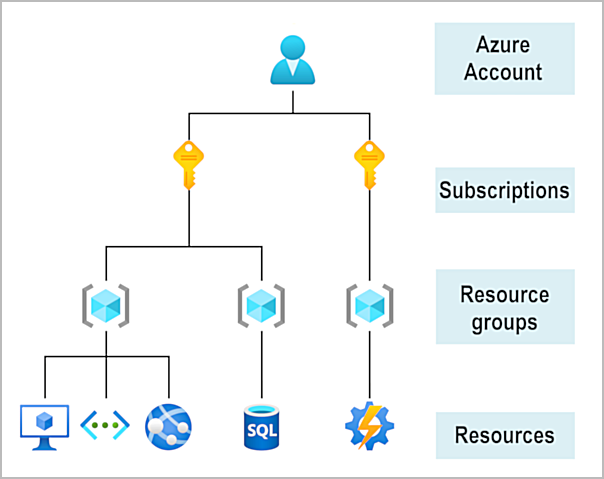
Each account has a number of subscriptions for individuals. Each subscription can have a number of resource groups. Each resource group can have a number of resources (services).
Describe Azure physical infrastructure
The physical infrastructure for Azure starts with datacenters. At a fundamental level they aren't different from large corporate datacenters, and they're all around the world. These datacenters are grouped into availability zones or regions.
A region is a geographical area on the planet that contains one or more datacenters that are physically nearby and networked together. Azure (the greater service) assigns and controls the resources available to each region. When you deploy a resource you have to select which region you want to deploy it to.
Availability zones are the physically separate groups of datacenters that make up a region. Multiple datacenters make up a zone, while multiple zones make up a region. This helps set up redundancy; if one zone goes down, the others can pick up the slack.
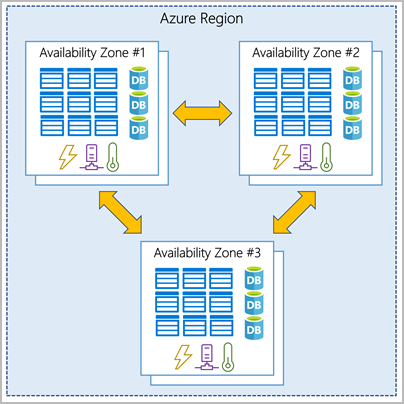
Availability zones and regions help introduce data redundancy to your applications and increase the availability of your applications under various circumstances. When a datacenter goes down, another one in the zone can take its place in your app, and this scales up; if a zone goes down, another can take over.
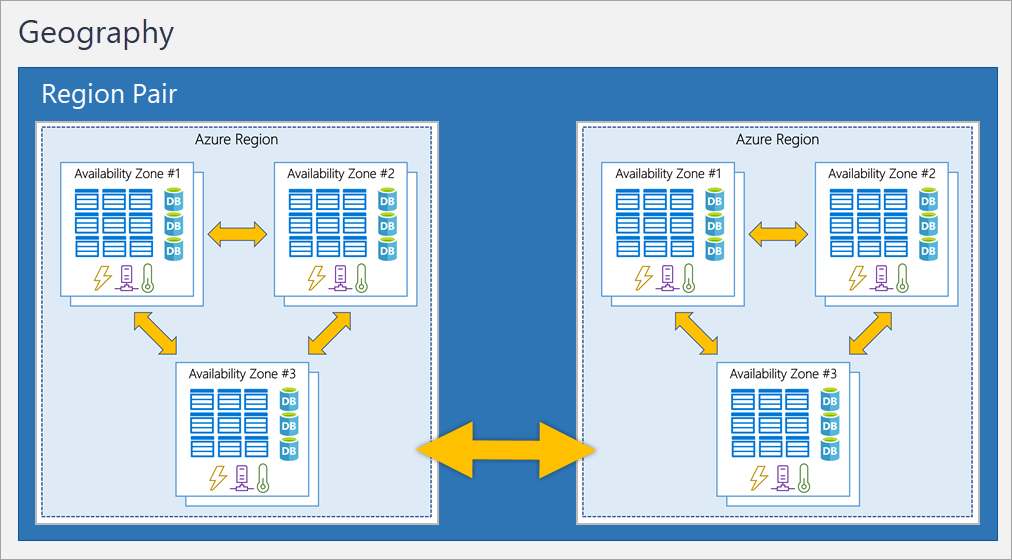
For regions, redundancy is a little different. For each geographic area, regions are paired with one another such that if one region goes down, its data is replicated to a separate and/or distant region.
When it comes to government agencies, Microsoft works with nations to create isolated regions that exist outside the main instance of the Azure mothership. Examples are the US DOD and Chinese regions directly managed by a Chinese 3rd party.
Describe Azure management infrastructure
A resource is the basic building block of Azure. Anything you create, provision, deploy, etc. is a resource.
Resources are related with resource groups. It's a requirement that a resource belong to a resource group, even if it's just one resource.
A resource can only belong to one resource group, although a resource group can contain many resources. Resource groups cannot be nested within each other.
If you move a resource to a different resource group, it loses any and all relations it had to the prior one.
If a resource group is deleted, so are all the resources within it without exception.
Resource groups can be "styled" to your needs: you can create an easily-disposable dev environment where it has all necessary resources for a project, or you can create multiple resource groups for cloud compute resources and divide them between users via permissions.
To use resources, you as an individual need a subscription. Subscriptions are how Microsoft tracks your usage and bills you for it. With subscriptions, you can organize resources together and create separate bills.
Subscriptions are grouped under accounts, and accounts are identities recorded in Entra ID. The way the account <-> subscription pipe works is described like:
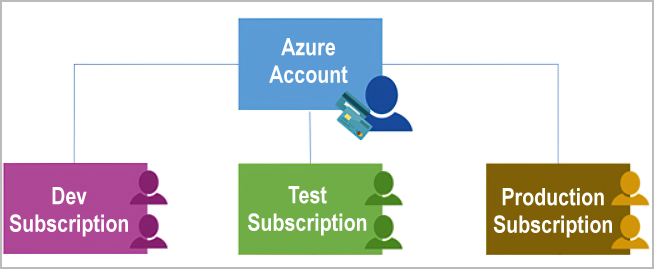
Any given account can have multiple subscriptions. You can define subscription boundaries to control how your bill is spread out. Billing boundaries allow you to make each subscription its own bill, and access control boundaries allow you to limit what resources a subscription can provision.
Management groups are how you organize subscriptions together: they give you control over who has permission to provision what and how you'd like your billing per subscription to be organized.